
Two kinds of reminder
A reorder reminder with the suggested order, and a separate stocktake reminder so the counts stay current. Each runs on its own schedule, per shop.
Stock reorder software
Most shops reorder once someone notices the gap. Restock ERP sends each shop a reorder reminder, with the order already filled in. If you’re after reorder points for your own warehouse, this isn’t it.
R4,999 to R21,999 a month ex VAT, depending on how many stockists order through it.
Billing starts with your first stockist order, or 30 days after go-live if that comes first.
Made by Shapeshift Digital, a South African software company with 23+ years behind it.
We load your products and a few of your stockists first, so the reminders you see on the call are built from your own range.
Pick a slot at least two working days away, so we have time to load your lists. We’ll email you within one working day to ask for your product list and a few of your stockists.
Pick your timeNot ready to pick? We’ll call or WhatsApp you to set one up.
Placeholder: client logo ribbon
Add tenant logos only with written sign-off. Hidden in production.
On the shelf
Your sales figures show what went out. They don’t show the deli whose shelf has been empty since Friday. Most of the time, you hear about it late and second-hand.
It got the business this far.
As you grow, it costs more: shops nobody got round to asking, and shelves left empty.
Ricky van der Walt, founder · 38 seconds
Restock asks every shop on a schedule, so a quiet one doesn’t slip past you.
Give us 10 minutes How the reorder works“Which of your stockists stopped ordering this month? Not slowed down. Stopped. Nobody phones to say they’re done. They just don’t order. Your WhatsApp is full of the shops that did. The quiet one doesn’t make a sound. Meanwhile there’s a gap on their shelf, and shoppers don’t wait for you. And by the time your rep gets back to that town, someone else is their supplier. You don’t lose stockists in an argument. You lose them in silence. I’ve sat with a lot of suppliers this year. Most can tell me what they sold. Very few can tell me who stopped. So I’m curious. How do you find out a shop’s gone quiet?”
What the numbers say
72%
of retail stockouts trace back to in-store ordering and replenishment, not the factory.
about 1 in 4
shoppers buy a competing brand when the shelf is empty.
Source: Corsten & Gruen, retail out-of-stock studies. Industry figures, not Restock results.
What it looks like
Simplified examples with sample data. The real screens are further down, and on the call you see them with your own products and stockists in them.
| Product | Min | On shelf | Suggested |
|---|---|---|---|
| Granola 500g | 24 | 12 | 12 |
| Rusks 450g | 16 | 8 | 8 |
| Peri-peri sauce 250ml | 12 | 6 | 6 |
| Muesli bars 6-pack | 20 | 20 | 0 |
| Yoghurt 1kg · Chilled | 10 | 3 | Blocked: out at your warehouse |
Hi Corner Deli, it’s reorder day. Based on Tuesday’s count, here’s what brings your shelf back to its minimum:
Change anything you need, then confirm. Or skip this one.
08:02 Review and confirm orderInside Restock ERP
Taken from our demo account. The shops and products are made up. The software is what you’d use.
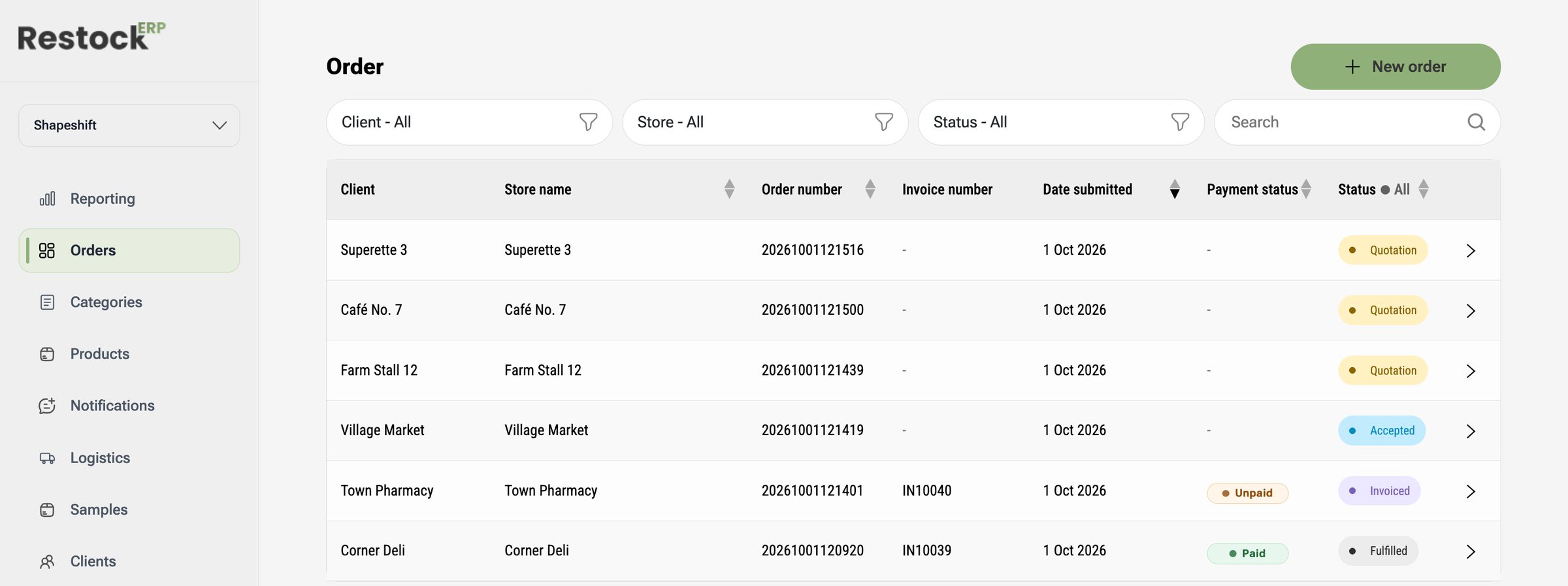
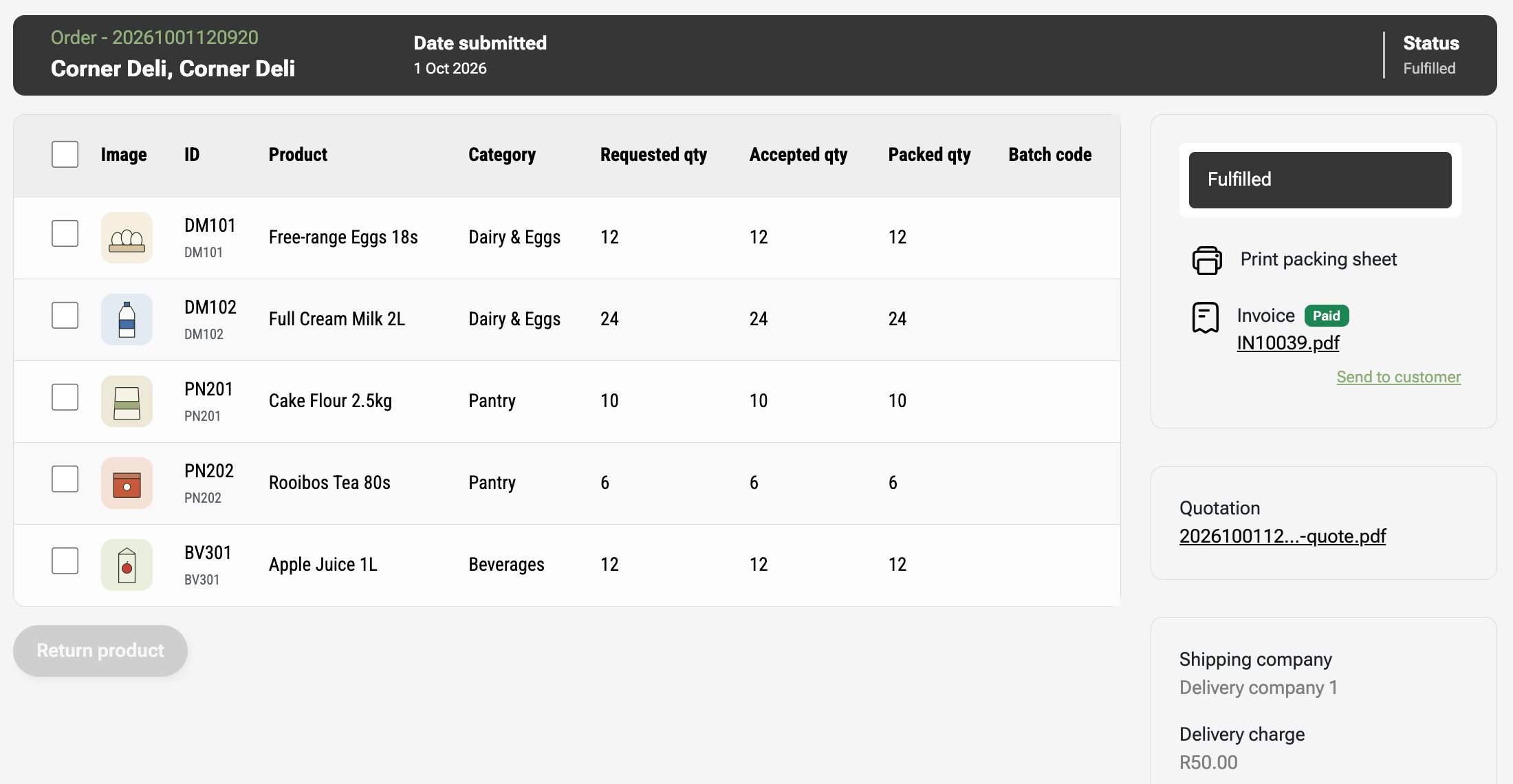
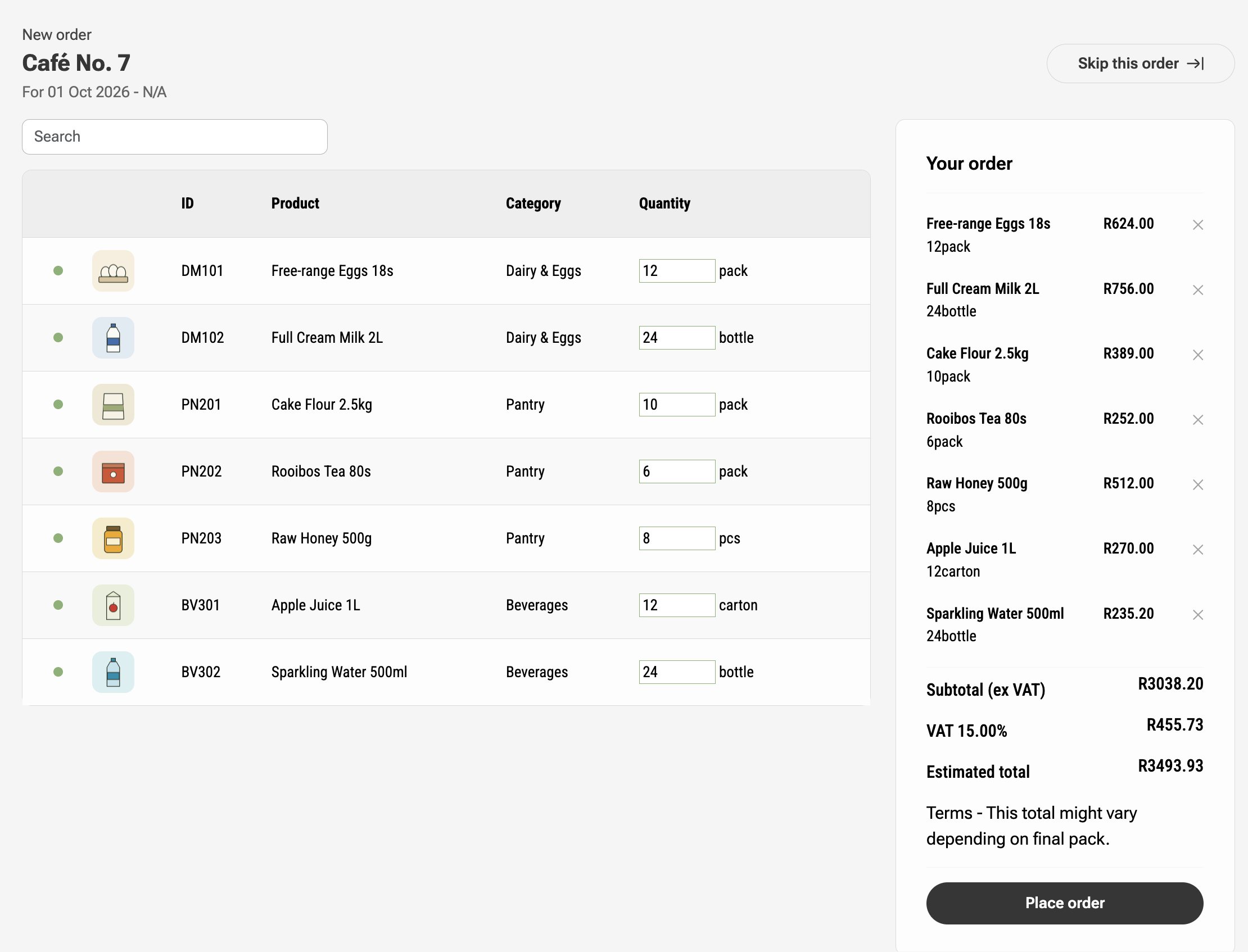
Replenishment, step by step
Restock can’t see inside a shop. Someone counts the shelf, and the rest follows from that count.
Per product, per shop (Restock calls it the stock threshold). We start it from the shop’s own order history, then your rep and the stockist agree it.
Your rep counts it on the round, or the shop enters it. A separate stocktake reminder keeps the counts coming. No count, no suggestion.
On that shop’s own schedule, carrying the suggested order: the minimum, less what’s on the shelf, line by line.
The shop changes any quantities and confirms it, or skips it. Your rep can do it for them. You accept it, and it moves on to invoice and dispatch.
Your stockists
No app, and on day one nobody has to log in. Each stockist moves up when it’s ready, and some never need to.
Same as now, but the rep starts from the suggested order instead of a blank page. This can carry on for as long as you like.
The reminder arrives by WhatsApp or email with the order filled in. The shop checks it, changes what it needs to, and confirms from the link.
If a stockist wants to manage its own shelf minimums, it gets its own login. You still see every order it places.
What it does
The reminder is where it starts. This is what Restock ERP does with the order once it’s confirmed.
A reorder reminder with the suggested order, and a separate stocktake reminder so the counts stay current. Each runs on its own schedule, per shop.
Book a rep’s visit against a shop, with a date, time and a note, so counts happen on a plan rather than only when a shop runs out.
Your own stock-on-hand figure sits behind every order. A product at zero is marked out of stock and blocked, so a shop can’t confirm a line you’ve run out of.
Up to ten price lists, ex VAT. Each shop sits on one, with overrides per category, so a confirmed reorder gets the right price.
Accepted, packed, invoiced and dispatched from one record, with invoices and delivery notes carrying your VAT and bank details. The shop is told when it’s accepted, invoiced and dispatched.
Sales per shop and per rep, each product’s average per week, and orders by status with a year-on-year comparison. Download as CSV or PDF.
Price and setup
We load your products, prices and stockists before you go live, so you can take orders from day one.
R4,999 to R21,999 a month ex VAT, depending on how many stockists order through it
Send us your products, prices and stockists in a clean spreadsheet and we load them at no charge. If the data needs cleaning up first, we quote for that before we start.
No lock-in contract. If it isn’t working for you, you stop.
That’s when your first stockist order comes through Restock, or 30 days after go-live if that comes first.
Restock ERP works on the shelves of the shops you sell through, from the counts your rep or the shop takes, so they don’t run dry.
“Real quote from a live Restock ERP tenant about reorders or reminders goes here. One or two sentences, ideally with a number they’ve seen themselves.”
Name, role, company. Photo optional. Add only with written permission.
R4,999 to R21,999 a month ex VAT. Where you land depends on how many stockists order through Restock. Tell us roughly how many in the form and we’ll give you the exact figure on the call.
No contract: it runs month to month. Loading your data is free if your spreadsheets are clean. If they need cleaning up first, we quote for that before we start. Billing starts with your first stockist order, or 30 days after go-live if that comes first.
No. The reminder goes out automatically, on each shop’s own schedule, with the suggested order already filled in. A person still confirms every order, the shop can change quantities or skip a reminder, and your rep can adjust it too. Nothing reaches your warehouse that someone didn’t agree to.
Shelf minimum, less what’s on the shelf. Each product in each shop has a minimum. It starts from that shop’s own order history, or a comparable shop if it’s new, and your rep and the stockist agree it. When the shelf is counted, the gap becomes the suggested order, line by line.
Someone counts it. Your rep does it on the round, or the shop enters it. Where a shop’s till has an API, we can build a connection to read the count, but that’s a build, not something that works out of the box. Restock can’t see inside a shop: no count, no suggestion.
No app. On day one nobody has to log in: your rep keeps placing orders for them, starting from the suggested order, or the shop confirms from a WhatsApp or email link. Later, a shop that wants to manage its own shelf minimums gets its own login.
It becomes a normal order in your list, at that shop’s price. You accept or decline it, then it moves through packing, invoice and dispatch like any other order, and the shop is told when it’s accepted, invoiced and dispatched.
Restock ERP runs the order side. Invoices, delivery notes and credit notes go across to your accounting system, and payment status comes back. Ask us on the call whether yours connects today. If it isn’t connected yet and it has an open API, we can build the connection.
Send us your product list and a few of your stockists. We load them in before the call.
Give us 10 minutesBilling starts with your first stockist order, or 30 days after go-live if that comes first.